
⚠️Licensing is required to access specific Trilion features
Please review the following instructions to confirm your license status and installation process.
🧑💻Installation
Step 1: Drag and Drop the Add-on
- Simply drag and drop the add-on file anywhere onto the main screen of ZEISS Correlate once the application is open.
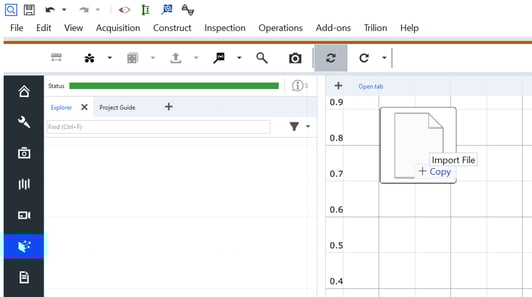
Step 2: Access the AppData Folder
- Open File Explorer.
- In the address bar, type %AppData% and press Enter.
- Then go to the Roaming folder.
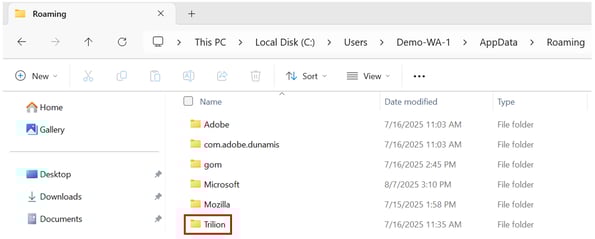
Step 3: Create Required Folder Structure
Navigate or create the following folder path:
%AppData%\Roaming\Trilion\Resources\Strain Certification
- If the Trilion folder does not exist, create it.
- Inside Trilion, create a folder named Resources (if it doesn't already exist).
- Inside Resources, create a folder named Strain Certification (if it doesn't already exist).
Step 4: Required Files and Folders
Inside the Strain Certification folder, ensure the following items are present:
- certifications.csv
- fixtures.csv
- gauges.csv
- Images folder
- Templates folder
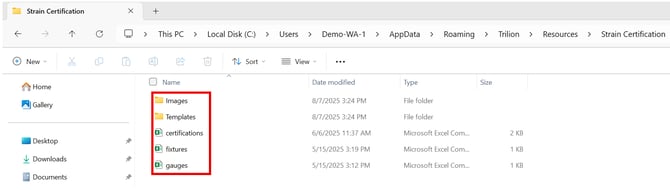
⚠️Before using the tCert Add-on, 3 files need to be present in the correct folder.
🗃️Prerequisites after installation
Before using the tCert Add-on, the following files must be present:
1) Stran Validation.ini-
- Inside the Trilion folder, it should contain the Strain Validation.ini file.

- Inside the Images folder, it should contain two images for failed and passed.
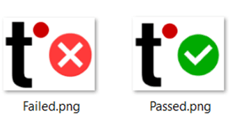
- Inside the Templates folder (Trilion Folder), it must contain all project templates that are linked to the certification blocks. Names must match exactly as written in the fixtures.csv file.
- These templates and gauges will be provided by Trilion.